What are your git aliases?
Jose Angel Munoz

Jose Angel Munoz @imjoseangel

About: 👨🏽‍💻 Cloud-Ops Developer Engineer and Open Sourcerer. ♥ DevOps Culture, Python, Infrastructure and SRE. 모르겠다

Location:
Madrid, Spain, Europe, Earth
Joined:
Jul 11, 2017

What are your git aliases?

Publish Date: Sep 28 '22
77 52

Introduction

I've been requested multiple times about sharing my .gitconfig to copy my aliases.

I use git aliases for two reasons:

  1. To improve productivity.
  2. To remember interesting git commands and learn from them.

My Gitconfig

These are my aliases included in my ~/.gitconfig file for your reference:

[alias]
    a = add .
    aliases = config --get-regexp alias
    alias = ! git config --get-regexp ^alias\\. | sed -e s/^alias.// -e s/\\ /\\ $(printf \"\\043\")--\\>\\ / | column -t -s $(printf \"\\043\") | sort -k 1
    ap = add . -p
    addups = remote add upstream
    bd = branch -d
    bi = bisect
    bl = branch -l
    blr = branch -a
    br = branch -r
    ca = commit -a
    cam = commit -a -m
    ci = commit -m
    cia = commit --author='imjoseangel <anotheremail@example.com>' -m
    cm = commit
    co = checkout
    colast = checkout -
    comments = commit -m 📒Comments
    count = rev-list --count devel
    db = branch -D
    forgetAbout = rm --cached
    formatting = commit -m 💅Formatting
    fp = fetch -p
    grep = grep -F
    laf = fsck --lost-found
    last = log -1 HEAD
    latest = log -5 --pretty --oneline
    ls = ls-files --others --exclude-standard -z
    mend = commit --amend
    nb = checkout -b
    op = gc --prune=now --aggressive
    pdo = push -d origin
    pf = push --force-with-lease
    po = push origin
    pou = push --set-upstream origin
    pr = pull --rebase
    pror = remote prune origin
    prud = pull --rebase upstream devel
    prum = pull --rebase upstream main
    prune = remote update --prune
    ptag = push origin --tags
    ra = rebase --abort
    rc = rebase --continue
    refactor = commit -m 👷Refactor
    remotes = remote -v
    renb = branch -m
    rh = reset --hard
    rhh = reset --hard HEAD
    ri = rebase -i upstream/devel
    rim = rebase -i upstream/main
    rl = reflog
    rp = repack -ad
    s = status -s
    search = rev-list --all
    sh = show
    short = shortlog -sn
    sign = commit --amend --no-edit --signoff
    st = status
    stashes = stash list
    tests = commit --allow empty -m ✅Tests
    tuto = help tutorial
    tuto2 = help tutorial-2
    unstash = stash pop
    vc = clean -dfx
    wow = log --all --graph --decorate --oneline --simplify-by-decoration
Enter fullscreen mode Exit fullscreen mode

Running git alias after adding to the .gitconfig shows the list of all the aliases as a reference list.

To get more info, just run git help <command or alias>. For instance:

git help st
'st' is aliased to 'status'
Enter fullscreen mode Exit fullscreen mode
git help status
Enter fullscreen mode Exit fullscreen mode

There are two aliases I find interesting for beginners:

git tuto
git tuto2
Enter fullscreen mode Exit fullscreen mode

Comments and suggestions with different approaches are always welcomed.

Comments 52 total

  • Michael Beckwith
    Michael BeckwithSep 29, 2022

    I mostly just stick with these:

    alias gdiff="git difftool"
    alias gap="git add -p"

    Everything else is longform because I prefer to be familiar with the most common commands in case i'm ever not on a computer that's mine.

  • Thomas Bnt
    Thomas BntSep 29, 2022

    Good timing this post!

    I recreated my WSL space on my Windows 10, and I created some aliases for git and others commands.

    aliases ga="git add"
    aliases gc="git commit -m $1"
    aliases gp="git push"
    aliases gpu="git pull"
    
    Enter fullscreen mode Exit fullscreen mode

    😄🙌

  • Juan F Gonzalez
    Juan F Gonzalez Sep 29, 2022

    Well, my git alias list is not that long. It's like 8 lines which are for the most used git commands. And I don't have aliases for commands with different flags.
    But that's the good thing about it, personalization rules.

  • Adijat Motunrayo Adeneye
    Adijat Motunrayo AdeneyeSep 29, 2022

    Hello, how do I add my alias

    • Jose Angel Munoz
      Jose Angel MunozSep 30, 2022

      Hi @motuncoded , just create a .gitalias file in your home:

      cat ~/.gitconfig, and add your list in the [alias] section as shown in the post.

      Let me know if it help.

      Thank you!

  • FJones
    FJonesSep 29, 2022

    The only one I sometimes configure is git s for status, but even that I usually just type out. One thing I did alias was merging current branch to our integration branch, which lets me easily chain either the push or the push and checkout $currb after it, or waiting for the CI pipeline to start before pushing.

    Though I do sometimes think about aliasing m to merge --no-edit and ca to merge --amend --no-edit, because I often forget to add the no-edit param and get annoyed by the need to quit nano.

  • necrophcodr
    necrophcodrSep 30, 2022

    I don't believe using aliases is a good idea. I seldom use it even in my shell, but I prefer to leave it out entirely with applications that I might not be the only one using. And Git is definitely not something of which I'm the sole user, so avoiding aliases makes it much easier to remember the full commands as they would be available for my friends and colleagues if I need to help them out, or if I'll be writing documentation on how we're doing certain processes.

    In those cases I think using an alias will cause more harm than good, and so I avoid them. The extra keystrokes are not an issue for me, as I'm a slow thinker anyways, haha.

    • Jose Angel Munoz
      Jose Angel MunozSep 30, 2022

      I understand @necrophcodr , You can always have them to learn new commands and git options. Thanks for sharing!

  • olsard
    olsardSep 30, 2022

    Nice, thanks for sharing.
    I would add some of my aliases

    no-edit = commit --amend --no-edit
    back = reset --soft HEAD~1
    back2 = reset --soft HEAD~2
    back3 = reset --soft HEAD~3
    
    Enter fullscreen mode Exit fullscreen mode
  • tPenguinLTG
    tPenguinLTGSep 30, 2022

    My aliases are either things I use regularly or things that I find useful on occasion and would otherwise have to look up every time. I've added explanatory comments to some of the less-obvious aliases.

    [alias]
        # File changes
        ## gen-ignore <lang>: Outputs a .gitignore file for `lang` from gitignore.io to stdout.
        gen-ignore = "!_gi() { curl -L -s https://www.gitignore.io/api/$@ ;}; _gi"
        ## ignore/hard-ignore: See https://stackoverflow.com/a/13631525
        ignore = update-index --assume-unchanged
        unignore = update-index --no-assume-unchanged
        hard-ignore = update-index --skip-worktree
        hard-unignore = update-index --no-skip-worktree
        ## ls-ignored: Lists files marked with assume-unchanged.
        ls-ignored = !git ls-files -v | grep '^[[:lower:]]' | cut -c 3-
        ## ls-hard-ignored: Lists files marked with skip-worktree.
        ls-hard-ignored = !git ls-files -v | grep -i '^S' | cut -c 3-
        word-diff = diff --word-diff
        char-diff = diff --word-diff --word-diff-regex='([^[:alnum:]]|[^[:space:]])'
        ## drop [stash_args...]: Like `reset HEAD`, but changes are recoverable from the stash reflog. Forwards arguments to `stash push`.
        drop = "!_drop() { git stash push \"$@\" && git stash drop; }; _drop"
        stat = status --short --branch
    
        # Commits
        ## init-commit: Initializes the repo and creates an empty initial commit.
        init-commit = !git init && git commit --allow-empty -m \"Initial commit\" -m \"This commit intentionally left blank.\"
        amend = commit --amend --no-edit
        fixup = commit --fixup
        squash = commit --squash
    
        # Log
        graph = log --graph --oneline
        log-yesterday = log --since=yesterday.midnight --oneline
    
        # Branches
        pulre = pull --rebase
        ## push-new: Pushes the current branch to `origin` with the same name and sets up tracking.
        push-new = push -u origin HEAD
        push-lease = push --force-with-lease
        ## sq [base_branch]: Starts an interactive rebase from the base of the branch relative to `base_branch`
        ##                   (defaults to `master`; can be any ref) without applying changes on top of `base_branch`.
        sq = "!_sq() { git rebase --interactive --autosquash $(git merge-base HEAD ${1:-master}); }; _sq"
    
    Enter fullscreen mode Exit fullscreen mode

    push-new can easily be rewritten to accept other remote names as arguments, and sq's default can be changed to use main or pull init.defaultBranch from the Git config instead of master.

    I tend not to use too many short forms or have too many aliases because tab completion exists and I don't want to develop non-portable muscle memory.

    • Jose Angel Munoz
      Jose Angel MunozSep 30, 2022

      Wow! I will take some from you and adding to my list of learning commands. Thanks!

  • Michael Z
    Michael ZSep 30, 2022

    I have a handful of useful git aliases that help me be more productive:

  • Todd Pressley
    Todd PressleyOct 1, 2022

    wow… @tpenguinltg ’s stuff - that’s on a different level entirely (: can’t wait to try some of those!

    i use many of the aliases shared by others regularly. one alias in particular saves me a ton of time daily:

    #!/bin/bash
    
    alias gmd=“git checkout development && git pull && git checkout - && git merge development”
    alias push=“gmd && git push”
    
    Enter fullscreen mode Exit fullscreen mode
    1. stashes any wd changes
    2. checks out development/master/etc
    3. pulls the latest
    4. checks out the previous branch
    5. merges the latest from the main (e.g. development), then lastly

    It’s not strictly a git alias, i know, though you could prob make that work 🤷‍♂️ never tried 😉 useful nonetheless IMH

    I use it anytime i’m done with a feature and need push and open a PR on main.

    great post. inspiring stuff!

    • tPenguinLTG
      tPenguinLTGOct 4, 2022

      Did you know you can shorten your gmd alias to just git pull origin development (assuming origin is the correct remote)? It's not exactly the same since it won't update your local development branch, but it will do the important part and make your current branch up to date with the remote development.

  • Eric Haynes
    Eric HaynesOct 1, 2022

    Great list! Will definitely add a few of these.

    A few more that I like:

    # oops, missed a file in prior commit
    ca = commit --amend --no-edit
    fa = fetch --all --prune
    # IMO this option should be the default for force pushing
    pf = push --force-with-lease
    # thing you do for first push of a branch
    pu = push -u origin HEAD
    # create a WIP commit without running precommit
    wip = commit -m\"WIP\" --no-verify
    # "uncommit"
    pop = reset HEAD^
    # list branches by most recent commit
    recent = for-each-ref --sort=-committerdate --count=30 --format='%(refname:short)' refs/heads/
    
    Enter fullscreen mode Exit fullscreen mode
  • Orlando Brown
    Orlando BrownOct 1, 2022

    Sorry to be a Party Pooper!!
    But why not use ZSH with the Oh ZSH add-on and it's various plugins. ohmyz.sh/

    Even posted on Dev.to
    dev.to/0xkoji/do-you-know-oh-my-zs...

  • Uchechukwu Obasi
    Uchechukwu ObasiOct 1, 2022

    Great aliases you've got!
    I have just one git alias at the moment and that is:

    [alias]
        ## sign your commit message
        csm = commit -s -m
    
    Enter fullscreen mode Exit fullscreen mode

    This comes very handy especially if you contribute to open source projects frequently.

  • Jose Angel Munoz
    Jose Angel MunozOct 2, 2022

    Nice ones also @ginomempin . Thanks for sharing!

  • Primo
    PrimoOct 2, 2022

    I have only two aliases:

    [alias]
        changes=!git fetch && git log --name-status HEAD..
        fire=git add . && git commit -m "OMG, FIRE" && git push
    
    Enter fullscreen mode Exit fullscreen mode
  • Dan Jones
    Dan JonesOct 3, 2022
    [alias]
            line = log --oneline
            st = status -sb
            last = log -1 HEAD --stat
            fap = fetch --all --prune
            cb = checkout -b
            gc-full = gc --prune=now --aggressive
            search = "!f() { s=\"$1\"; shift; if (( $# > 0 )); then set -- @; fi; git rev-list \"$@\" | xargs git grep \"$s\" ; }; f"
            changed-files = "!f() { git log --name-only --pretty=oneline --full-index \"$1\" | grep -vE '^[0-9a-f]{40}'|sort|uniq;}; f"
            push-new = !git push -u upstream $(git rev-parse --abbrev-ref @)
    
    Enter fullscreen mode Exit fullscreen mode

    Also, for work specifically, my company works on GitHub, and I have a bash script to easily create a new PR from the current branch.

    #!/bin/bash
    
    set -eu
    
    declare -r UPSTREAM_NAME=upstream
    declare MERGE_BRANCH=main
    
    declare -r BRANCH=$(git rev-parse --abbrev-ref HEAD)
    
    declare UPSTREAM_URL=$(git remote get-url upstream)
    UPSTREAM_URL=$(echo "$UPSTREAM_URL" | sed -E -e 's|^git@|https://|' -e 's|.com:|.com/|' -e 's/.git$//')
    
    MERGE_BRANCH=${1:-$MERGE_BRANCH}
    
    declare -r PR_URL="${UPSTREAM_URL}/compare/${MERGE_BRANCH}...${BRANCH}?expand=1"
    
    echo $PR_URL
    open $PR_URL
    
    Enter fullscreen mode Exit fullscreen mode

    I name it git-new-pr, and add it to my $PATH. Then, I can call git new-pr, and it'll automatically open up a page for a new PR in my browser.

    This script is for macOS. So, the last line opens the URL in the default browser. If using Linux, this could be xdg-open $PR_URL. Also, a specific browser could be specified.

    Most people would just use the GitHub cli for this, but I've never bothered installing it, and this works really well.

  • Valentin Nechayev
    Valentin NechayevOct 4, 2022

    The thing that confuses is that alias set is very uneven in sense of pressings. If you press something on keyboard, you anyway press some sequences, and all git commands start with "git " - already 4 presses... After it, difference, for example, between "git br" = "git branch -r" and "git b -r" where "b" is already aliased as "branch" is nearly void, compared with any other difference. This suggests the alias set is accrued historically without substantial reconcerning.

    Alias "db" is dangerous. I prefer to write such actions only explicitly. Same for "op": it's normal to refer to something done a few days ago, and for "vc". (BTW do you use IDE? Something like "git clean -dfx -e .vscode" would be better.)

    What is use case for "search"?

    "last" could be extended with "--stat" to show changes, because anyway only a single commit is printed.

    OTOH, it clearly exposes some manners and developing approaches - as presence of "main" and "devel" branches. For me, it showed some features I was unaware or forgot them due to standing out of usual habits... thanks for this.

    Formatting was broken - e.g. what is "git alias" is unparseable (seems the website markdown was active). If it allows editing the post, please reconsider.

    To compare, my typical set (with comments):

       ae = add -e
    

    Maybe more specific to my manner, but it is typical to cache only some changes among ones in file (others could be for later commits, not committed as debug, etc.) - just interactive mode is not enough. Git's recalculating of chunk line count works well enough.

       amsh = am --show-current-patch
    

    In rebase, sometimes it is needed to see full patch to apply now.

        b = branch
    

    Just shortening for all branch related commands.

        cbr = rev-parse --abbrev-ref HEAD
    

    "current branch" in an easy solitary way.

       cia = commit --amend
       ciah = commit --amend -C HEAD
    

    To adjust the last commit with catch-up changes.

        ci = commit
       co = checkout
    

    Habitual from previous VCSes. To edit commit message is more useful because it never should be one-liner in a final version.

        dc = diff --cached
    

    Obviously needed before commit is created from parts.

        cp = cherry-pick
       cpa = cherry-pick --abort
       cpc = cherry-pick --continue
       cpnx = cherry-pick -n -x
       cpx = cherry-pick -x
    

    Maybe "cp -n", etc. is enough but often used in some flows.

        lggo = log --graph --oneline
        lg = log --graph
        lgf = log --graph --pretty=fuller --topo-order
        lgs = log --graph --stat
        logf = log --pretty=fuller --topo-order
        lpf = log -M -p --pretty=fuller
        lp = log -M -p
        lss = log -M --shortstat
        lstf = log -M --stat --pretty=fuller --topo-order
        lst = log -M --stat
        lggo = log --graph --oneline
        lg = log --graph
        lgf = log --graph --pretty=fuller --topo-order
        lgs = log --graph --stat
        logf = log --pretty=fuller --topo-order
        lpf = log -M -p --pretty=fuller
        lp = log -M -p
        lss = log -M --shortstat
        lstf = log -M --stat --pretty=fuller --topo-order
        lst = log -M --stat
    
    Enter fullscreen mode Exit fullscreen mode

    Convenience for log view styles.

        pura = pull --rebase --autostash
    
    Enter fullscreen mode Exit fullscreen mode

    For some flows, merge is impossible - it's required to actualize the working state regularly.

        rba = rebase --abort
        rbas = rebase --autostash
        rbc = rebase --continue
        rbi = rebase -i
        rbias = rebase -i --autostash
        rbs = rebase --skip
    
    Enter fullscreen mode Exit fullscreen mode

    Interactive rebase helpers in different styles to keep propositions clear.

        startempty = commit --allow-empty -m 'Initial empty'
    
    Enter fullscreen mode Exit fullscreen mode

    Rare but... for a new work, having basic empty commit is crucial to keep the first commit clear. Otherwise, complex dances with filtering are needed. (I'm wondering why it is not in Git base logic.)

    I'd also note some crucial settings out of aliases:

    merge.conflictstyle=diff3

    To show base version for a conflict - crucial both for a human and automatic merging tools.

    pager.status=true

    Otherwise some tools avoid paging.

    push.default=simple

    Never push many-to-many without an explicit specification in a command.

    pull.ff=only

    Useful default to minimize underwater pull effects.

    • Jose Angel Munoz
      Jose Angel MunozOct 4, 2022

      Thanks @netch80 I have reviewed the post and I some backslashes were missing. Thanks for your comments. Really helpful.

  • Valentin Nechayev
    Valentin NechayevOct 4, 2022

    NB "git wip" conflicts with standard alias setting for Gerrit, for which injection of an alias series "ready", "wip", etc. is suggested (and supported by a local installer).

  • Jose Angel Munoz
    Jose Angel MunozOct 4, 2022

    Wow! didn't know that. Thanks @natescode !!

  • Lui
    LuiOct 15, 2022

    I didn't read all that were postet but here are mine that I love the most.

    alias editaliases='vi ~/.zsh_aliases'
    alias loadaliases='source ~/.zsh_aliases'
    
    alias gb='git branch'
    alias gs='git status'
    alias ga='git add'
    alias gclean='git clean -f -d'
    alias gcomm='git commit -m'
    alias gmerge='git merge --no-ff -e'
    alias gpush='git push'
    alias pfusch='git push -f'
    alias grsh='git reset HEAD --hard'
    alias gback='git switch -'
    
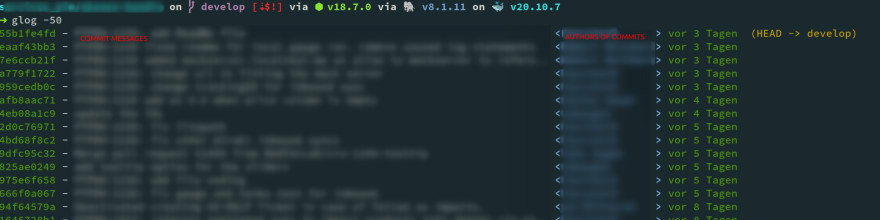
    alias glog="git --no-pager log $1 --pretty=format:'%Cgreen%h%Creset - %<(75,trunc)%s %C(bold blue)%<(15,trunc)<%an>%Creset %Cgreen%cr%Creset %C(yellow)%d%Creset' --abbrev-commit --date=relative"
    alias glogl="glog -10"
    alias glogy="glog --since=yesterday.midnight"
    alias glogt="git log --graph --pretty=format:'%Cgreen%h%Creset - %s %C(bold blue)<%an>%Creset %Cgreen%cr%Creset %C(yellow)%d%Creset' --abbrev-commit --date=relative"
    alias glogtl='glogt -10'
    alias glogf="git log --pretty=format:'%Cgreen%h%Creset - %<(75,trunc)%s %C(bold blue)%<(15,trunc)<%an>%Creset %Cgreen%cr%Creset %C(yellow)%d%Creset' --abbrev-commit --date=relative --follow"
    
    alias gfiles='git diff-tree --no-commit-id --name-only -r'
    alias gitrect="git reset HEAD --hard"
    
    Enter fullscreen mode Exit fullscreen mode

    Most used by me is glogl (git log last) and glog -100 (git log last 100)

    It creates an output like:

    Image description

  • Michael R.
    Michael R.Oct 16, 2022

    Wow, I think @tpenguinltg probably has some of the most elaborate ones I've seen, nice config you have there!

    And all of you have shared practical examples; hats off to the author and others who shared their aliases. I will add mine here, though most of them are a bit generic and unimaginative. 😅


    I do not take credit for these all myself, many I have adopted and modified along the way to fit my needs, and I hope you all can find something useful. Cheers!

  • Humberto A Sanchez II
    Humberto A Sanchez IIOct 16, 2022

    Really like this discussion. Added many of these to my .gitconfig

  • Viktor Krejčíř
    Viktor KrejčířOct 19, 2022

    general ones:

    alias gco="git checkout"
    alias gpsp="git push -o ci.skip"
    alias gswc="git switch -c"
    alias gmwps="git push -o merge_request.create -o merge_request.target=master -o merge_request.merge_when_pipeline_succeeds"
    alias gdfw="git diff --word-diff"
    alias gmrt="git merge --strategy recursive -X theirs"
    alias gbr="git branch --remotes --verbose --sort=-committerdate"
    alias gbl="git branch --verbose --sort=-committerdate"
    alias gps="git push"
    alias gpl="git pull --rebase"
    alias gpom="git push origin master"
    alias gpomn="git push origin main"
    alias gf="git fetch"
    
    Enter fullscreen mode Exit fullscreen mode

    And some specific commit messages (conventional commit is a thing):

    alias gcsmb='f() { git commit -S -m "[BUILD]: $1"  };f'
    alias gcsmc='f() { git commit -S -m "[CHORE]: $1"  };f'
    alias gcsmf='f() { git commit -S -m "[FEAT]: $1"  };f'
    alias gcsmfx='f() { git commit -S -m "[FIX]: $1"  };f'
    alias gcsmd='f() { git commit -S -m "[DOCS]: $1"  };f'
    alias gcsmt='f() { git commit -S -m "[TESTS]: $1"  };f'
    
    Enter fullscreen mode Exit fullscreen mode
  • Monika Derlutzki
    Monika DerlutzkiApr 15, 2023

    I dont use any :))

Add comment