
Why Local LLMs Matter
Large language models have completely changed how we build apps, but most of them live in the cloud. That means you’re often stuck dealing with slow responses, expensive API calls, and worries about privacy or needing an internet connection. Running models locally on your own machine avoids all that, and you get faster, private, and offline-ready AI right at your fingertips.
Docker Model Runner changes that it brings the power of container-native development to local AI workflows so you can focus on building, not battling toolchains.
The Developer Pain Points:
- Privacy concerns - It’s tough to test safely when your data has to be sent to cloud APIs.
- High costs - Running prompts through paid APIs adds up fast, especially during early development and testing.
- Complicated setup - Getting a local model up and running usually means dealing with complex installs and hardware dependencies.
- Limited hardware - Many laptops just aren’t built to run large models, especially without a GPU.
- Hard to test different models - Switching between models or versions often means reconfiguring your entire setup.
Docker Model Runner solves these by:
- Standardizing model access with a simple CLI that pulls models from Docker Hub
- Running fast with llama.cpp under the hood
- Providing OpenAI-compatible APIs out of the box
- Integrating directly with Docker Desktop
- Using GPU acceleration when available supports Apple Silicon (Metal) and NVIDIA GPUs on Windows for faster inference
🐳 What Is Docker Model Runner?
It’s a lightweight local model runtime integrated with Docker Desktop. It allows you to run quantized models (GGUF format) locally, via a familiar CLI and an OpenAI-compatible API. It’s powered by llama.cpp and designed to be:
- Developer-friendly: Pull and run models in seconds
- Offline-first: Perfect for privacy and edge use cases
- Composable: Works with LangChain, LlamaIndex, etc.
Key Features:
- OpenAI-style API served at:
http://localhost:12434/engines/llama.cpp/v1/chat/completions
- GPU-free: works even on MacBooks with Apple Silicon and Windows 11 + NVIDIA GPUs
- Easily swap between models with the UX and CLI
- Integrated with Docker Desktop
Getting Started in 5 Minutes
1. Enable Model Runner (Docker Desktop)
docker desktop enable model-runner --port 12434
2. Pull Your First Model
docker model pull ai/smollm2:360M-Q4_K_M
3. Run a Model with a Prompt
docker model run ai/smollm2:360M-Q4_K_M "Explain the Doppler effect like I’m five."
4. Use the API (OpenAI-compatible)
curl http://localhost:12434/v1/completions \
-H "Content-Type: application/json" \
-d '{"model": "smollm2", "prompt": "Hello, who are you?", "max_tokens": 100}'
⚙️ Building Your Local GenAI Stack
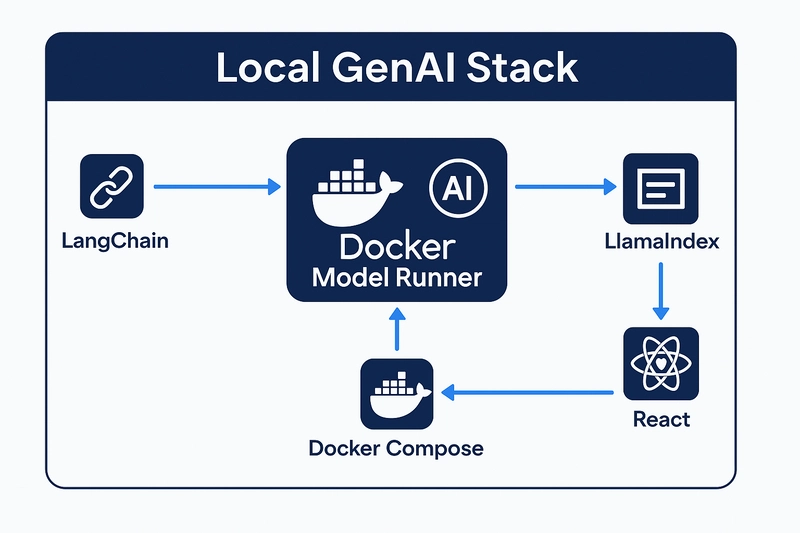
Here's a simple architecture using Docker Model Runner as your inference backend:
- LangChain: For prompt templating and chaining
- Docker Model Runner: Runs the actual LLMs locally
- LlamaIndex: For document indexing and retrieval (RAG)
- React Frontend: Clean chat UI to interface with the model
- Docker Compose: One command to run them all
Sample Compose Example
Here’s a sample docker-compose.yml showing how Docker Model Runner could fit into a local GenAI stack:
services:
  chat:
    build: ./chat  # Replace with your frontend app path or Git repo
    depends_on:
      - ai_runner
    environment:
      - MODEL_URL=${AI_RUNNER_URL}
      - MODEL_NAME=${AI_RUNNER_MODEL}
    ports:
      - "5000:5000"

  ai_runner:    # Even if a service of type `model` is specified,
                # It doesn't run as a container — it runs directly on
                  the host system via Docker Model Runner.

    provider:
      type: model
      options:
        model: ai/smollm2 # Specifies the local LLM to be used
Features:
- Offline use with local model caching
- Dynamic model loading/unloading to save resources
- OpenAI-compatible API for seamless integration
- GPU acceleration support on compatible systems
💡 Bonus: Add a Frontend Chat UI
Use any frontend framework (React/Next.js/Vue) to build a chat interface that talks to your local model via REST API.
Simple example fetch:
#!/bin/sh

curl http://localhost:12434/engines/llama.cpp/v1/chat/completions \
-H "Content-Type: application/json" \
-d ' {
"model": "ai/smollm2",
"messages": [
{
"role": "system",
"content": "You are a helpful assistant."
},
{
"role": "user",
"content": "Please write 500 words about the fall of Rome."
}
]
}'
This gives you a fully local LLM setup that runs straight on your machine whether you're on a MacBook with Apple Silicon or a Windows PC with an NVIDIA GPU. No cloud APIs, no internet needed. Just local models running natively.
🚀 Advanced Use Cases
- RAG pipelines: Combine PDFs + local vector search + Model Runner
- Multiple models: Run phi2, mistral, and more in separate services
- Model comparison: Build A/B testing interfaces using Compose
- Whisper.cpp integration: Speech-to-text container add-ons (coming soon)
- Edge AI setups: Deploy on airgapped systems or dev boards
The Vision: Where This Is Headed
Docker Model Runner Roadmap (Beta Stage):
- Potential for a searchable, taggable ModelHub or Docker Hub registry
- Plans to support Compose-native GenAI templates
- Exploration of Whisper + LLM hybrid runners
- Development of a dashboard for monitoring model performance
- IDE integrations, such as VSCode extensions for prompt engineering and testing, are still under discussion and not yet available
Note: Docker Model Runner is currently in Beta. Some features and integrations are in early stages or planning phases and may evolve over time.
As a developer, I see this as a huge opportunity to lower the barrier for AI experimentation and help bring container-native AI to everyone.


Thank you super helpful 🙂