Simple Screen Recorder in 20 lines of JavaScript
Nino Filiu

Nino Filiu @ninofiliu

About: Software engineer & visual artist

Location:
Paris
Joined:
Mar 23, 2020

Simple Screen Recorder in 20 lines of JavaScript

Publish Date: Nov 1 '23
168 14

Let's say you're fed up of the state of screen recorders' paywalls and limitations and want to go on coding your own - it turns out you can already have basic functionnalities in a few lines of code.

We can ask the browser to get the capture video stream for us using the screen capture API, but for security reasons we must ensure a user gesture triggered the capture, for example a button click:


const button = document.createElement("button");
button.innerHTML = "capture";
document.body.append(button);
button.addEventListener("click", async () => {
  // TODO
});


Enter fullscreen mode Exit fullscreen mode

On click, get the video stream and record it


const stream = await navigator.mediaDevices.getDisplayMedia();
const recoder = new MediaRecorder(stream);
recoder.start();


Enter fullscreen mode Exit fullscreen mode

Stop the recording when the user stops sharing the screen

Image description


const [video] = stream.getVideoTracks();
video.addEventListener("ended", () => {
  recoder.stop();
});


Enter fullscreen mode Exit fullscreen mode

Obtain the recorded file and download it


recoder.addEventListener("dataavailable", (evt) => {
  const a = document.createElement("a");
  a.href = URL.createObjectURL(evt.data);
  a.download = "capture.webm";
  a.click();
});


Enter fullscreen mode Exit fullscreen mode

And voilà, you have a simple screen recorder!

It has many limitations that would be fun to resolve - audio recording, webcam integration, long running streams, etc - but I just found that doing such a powerful thing already with so few lines of code was too awesome not to share.

codepen link

Comments 14 total

  • Dusan Petkovic
    Dusan PetkovicNov 1, 2023

    Oh interesting, wasn't aware that it was this simple.

  • Bogomil Shopov - Бого
    Bogomil Shopov - БогоNov 1, 2023

    Please consult the browser support before using it. Great article!

    • Nino Filiu
      Nino FiliuNov 1, 2023

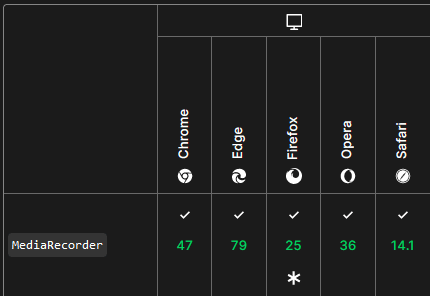
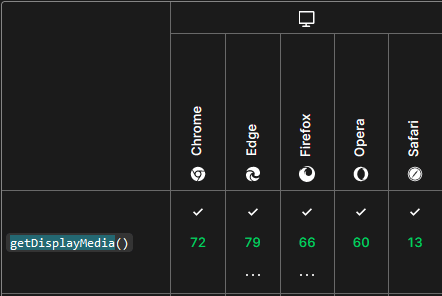
      I did :) both the recorder APIs and the screen capture APIs are in full support :)

      Image description

      Image description

      • Bogomil Shopov - Бого
        Bogomil Shopov - БогоNov 1, 2023

        I was talking about the others, so they might want to try it out on a different browser and to be surprised when it's not working :)

  • Neil Syiemlieh
    Neil SyiemliehNov 1, 2023

    Incredible how many APIs browsers have to implement. I guess many browsers rely on chromium for all/most-of these APIs? I wonder if new browsers like arc and vivaldi do that too

  • eshimischi
    eshimischiNov 1, 2023

    WebCodecs is even more interesting new Api. Just implemented live video converter from the camera and screen capture, still some experimental functions but works perfectly in the modern Chrome, webworkers.

    • Nino Filiu
      Nino FiliuNov 1, 2023

      Yes! Webcodecs is amazing. I'm rewriting supermosh.github.io so as to use web codecs atm!

    • Samuel Kelv
      Samuel KelvNov 2, 2023

      Wow, nice. Can I know more about the project?

  • Jordan-Tyler Burchett
    Jordan-Tyler BurchettNov 2, 2023

    Nice read and cool idea. Looks like a very handy API

  • Jukka-Pekka Keisala
    Jukka-Pekka KeisalaNov 2, 2023

    You learn something new every day. Thanks for this post, I am sure I will make this in use on somewhere, some day.

  • Samuel Kelv
    Samuel KelvNov 2, 2023

    Wow, great project idea. I'm not able to find the download link

  • Raja MSR
    Raja MSRNov 3, 2023

    Thank you for sharing this informative and well-written post, Nino! This article on creating a screen recorder with JavaScript is impressive!

  • Anuj Kumbhar
    Anuj KumbharNov 3, 2023

    Thank you for sharing with us with this information

  • Michael Tharrington
    Michael TharringtonNov 6, 2023

    Heyo! Wonderful post here. 🙌

    Just a heads up that you can embed CodePens here on DEV if you wanna.

    To do so, you just use this syntax:

    {% codepen https://codepen.io/ninofiliu/embed/BaMzxQM %}

    You definitely don't have to do this, but just letting you know if you'd like to.

    Notably, CodePen embeds behave a bit differently than most embeds on DEV (GitHub, YouTube, internal DEV embeds) which use a simplified syntax, for example:

    {% embed https://www.youtube.com/watch?v=dQw4w9WgXcQ&ab_channel=RickAstley %}

    Hope this is helpful to ya and thanks for sharing such a helpful post here on DEV!

Add comment