Creating a native executable in Windows with GraalVM
Mike 🐈‍⬛

Mike 🐈‍⬛ @skhmt

About: Software Engineer

Joined:
May 21, 2019

Creating a native executable in Windows with GraalVM

Publish Date: Jun 12 '19
26 4

GraalVM is pretty awesome for a lot of reasons. But the one that has me most hyped is the ability to create native executables from Java bytecode. This isn't like ExcelsiorJET (R.I.P.), which makes you include a large runtime, nor is it like Launch4J and Oracle's javapackager tool, both of which create a dummy executables that points to your .jar and a packaged JRE.

GraalVM makes real native executables without a packaged runtime.

Unfortunately, GraalVM's native-image, and indeed its entire support for Windows, is in early adopter status. There are some error messages that aren't accurate, some bugs, and some features missing.

But it does work, more-or-less.

Things to know before you get started

There's about a 8.5 MB minimum file size for a bare bones hello world java application. That's kind of a lot, but also a lot less than including the entire JRE.

Some other articles or guides recommend installing Git for Windows and Python 2.7, but I'm like 99% sure that's for building GraalVM before running.

All the Swing and JavaFX applications I've tried haven't been able to build in the Windows version of native-image in 19.0.0.

The Image Generation Options page is a good resource for troubleshooting, you may have to place some of your classes into the --initialize-at-run-time=<comma separated list of class/package names> option.

Steps to run GraalVM 19.0.0's native-image in Windows

  1. Uninstall any Visual C++ 2010 Redistributables
  2. Get the Windows version of GraalVM 19.0.0: https://github.com/oracle/graal/releases/tag/vm-19.0.0
  3. Extract it somewhere easy to find
  4. Get the Microsoft Windows SDK for Windows 7 and .NET Framework 4 (ISO): https://www.microsoft.com/en-us/download/details.aspx?id=8442
  5. Mount the image, open F:\Setup\SDKSetup.exe directly
  6. A default install should be perfect
  7. Run the Windows SDK 7.1 Command Prompt by going to Start > Microsoft Windows SDK v7.1 > Windows SDK 7.1 Command Prompt
  8. Run one of these commands based on if you have a .jar or a .class:
\path\to\graalvm-ce-19.0.0\bin\native-image -jar \path\to\helloworld.jar --no-fallback
Enter fullscreen mode Exit fullscreen mode

or

\path\to\graalvm-ce-19.0.0\bin\native-image \path\to\helloworld.class --no-fallback
Enter fullscreen mode Exit fullscreen mode

The *.exp, *.lib, and *.pdb files seem to be artifacts of the build process, they're not required for distribution.

But that's it, your .exe is made!

Update: As of GraalVM 19.3.0, still no support for Swing nor JavaFX.

For GraalVM 19.3.0 on Windows with the new support for Java 11, you'll need Visual Studio 2017 Community Edition instead of the Microsoft Windows SDK for Windows 7, which you can get here with a free Visual Studio Dev Essentials account. Instead of running the Windows SDK 7.1 Command Prompt, you'll of course run x64 Native Tools Command Prompt for VS 2017 as your command line in Start > Visual Studio 2017.

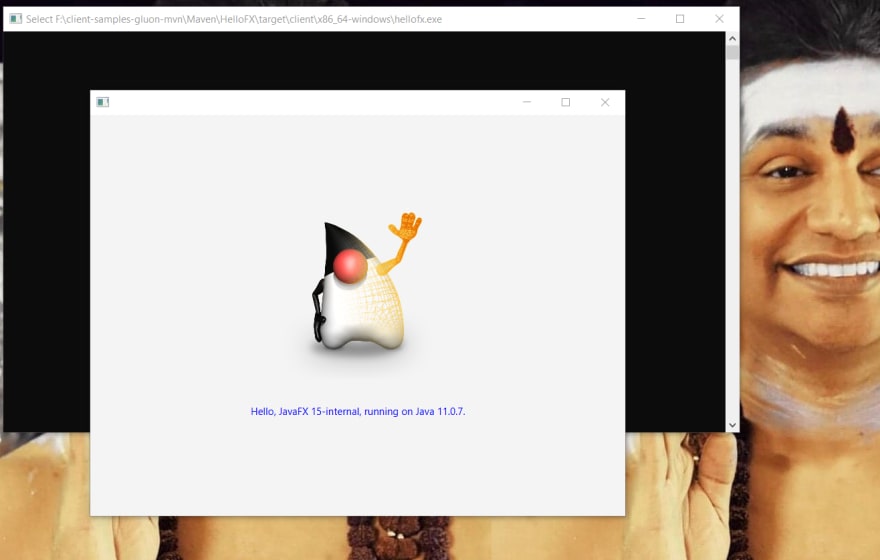
Gluon is working on providing JavaFX support for 19.3.0 - it already has it for macOS and Linux, and Windows should be coming soon.

Finally, if you do distribute an exe made with native-image on windows, you will need to include vcruntime140.dll with it, which is about 84kb.

Comments 4 total

  • Saurabh Sharma
    Saurabh SharmaJun 12, 2019

    aww, thats cool. ♥️

  • Shashank Tulsyan
    Shashank TulsyanJun 26, 2019

    I tried to make graal native image to work for javafx, and failed, leaving notes for the record.
    Even after making several configurations changes I am not able to get it to work.

    The project I am compiling is thejavafxproject
    with the entry point - JavaFxEntryPointMainMethod

    This is the command I used to build the native image.

    \graalvm-ce-19.0.2\bin\native-image.cmd -H:+ReportExceptionStackTraces -H:JNIConfigurationFiles=jniconfig.json -H:ReflectionConfigurationFiles=reflectconfig.json -Djavafx.verbose=true -Dprism.verbose=true -Djava.library.path=\graalvm-ee-19.0.2\jre\bin -cp \graalvm-ee-19.0.2\jre\lib\ext\jfxrt.jar -jar thejavafxproject.jar 
    ~~~~
    
    
    I am able to get a native image, which will crash :'( 
    
    
    # reflectconfig.json
    
    Enter fullscreen mode Exit fullscreen mode

    [
    {
    "name" : "java.lang.Class",
    "allDeclaredConstructors" : true,
    "allPublicConstructors" : true,
    "allDeclaredMethods" : true,
    "allPublicMethods" : true,
    "allDeclaredClasses" : true,
    "allPublicClasses" : true
    },
    {
    "name" : "java.lang.String",
    "fields" : [
    { "name" : "value", "allowWrite" : true },
    { "name" : "hash" }
    ],
    "methods" : [
    { "name" : "", "parameterTypes" : [] },
    { "name" : "", "parameterTypes" : ["char[]"] },
    { "name" : "charAt" },
    { "name" : "format", "parameterTypes" : ["java.lang.String", "java.lang.Object[]"] }
    ]
    },
    {
    "name" : "java.lang.String$CaseInsensitiveComparator",
    "methods" : [
    { "name" : "compare" }
    ]
    },
    {
    "name" : "thejavafxproject.JavaFxEntryPointMainMethod"
    },
    {
    "name" : "com.sun.javafx.tk.quantum.QuantumToolkit",
    "methods" : [
    { "name" : "", "parameterTypes" : [] }
    ]
    },
    {
    "name" : "com.sun.prism.d3d.D3DPipeline",
    "allDeclaredConstructors" : true,
    "allPublicConstructors" : true,
    "allDeclaredMethods" : true,
    "allPublicMethods" : true,
    "allDeclaredClasses" : true,
    "allPublicClasses" : true
    },
    {
    "name" : "com.sun.prism.impl.PrismSettings",
    "allDeclaredConstructors" : true,
    "allPublicConstructors" : true,
    "allDeclaredMethods" : true,
    "allPublicMethods" : true,
    "allDeclaredClasses" : true,
    "allPublicClasses" : true,
    "allPublicFields" : true
    },
    {
    "name" : "com.sun.glass.ui.win.WinPlatformFactory",
    "allDeclaredConstructors" : true,
    "allPublicConstructors" : true,
    "allDeclaredMethods" : true,
    "allPublicMethods" : true,
    "allDeclaredClasses" : true,
    "allPublicClasses" : true,
    "allPublicFields" : true
    }
    ]

    ~~~~

    jniconfig.json

    [
      {
        "name" : "com.sun.prism.impl.PrismSettings",
        "allDeclaredConstructors" : true,
        "allPublicConstructors" : true,
        "allDeclaredMethods" : true,
        "allPublicMethods" : true,
        "allDeclaredClasses" : true,
        "allPublicClasses" : true,
        "allPublicFields" : true
      }
    ]
    ~~~~


    #A 10MB exe is created thejavafxproject.exe
    
    
    Enter fullscreen mode Exit fullscreen mode

    thejavafxproject.exe -Djavafx.verbose=true -Dprism.verbose=true -Djava.library.path=graalvm-ee-19.0.2\jre\bin\
    ~~~~

    Output - on running the executable

    Loaded \graalvm-ee-19.0.2\jre\bin\api-ms-win-core-console-l1-1-0.dll from java.library.path
    Loaded \graalvm-ee-19.0.2\jre\bin\api-ms-win-core-datetime-l1-1-0.dll from java.library.path
    Loaded \graalvm-ee-19.0.2\jre\bin\api-ms-win-core-debug-l1-1-0.dll from java.library.path
    Loaded \graalvm-ee-19.0.2\jre\bin\api-ms-win-core-errorhandling-l1-1-0.dll from java.library.path
    Loaded \graalvm-ee-19.0.2\jre\bin\api-ms-win-core-file-l1-1-0.dll from java.library.path
    Loaded \graalvm-ee-19.0.2\jre\bin\api-ms-win-core-file-l1-2-0.dll from java.library.path
    Loaded \graalvm-ee-19.0.2\jre\bin\api-ms-win-core-file-l2-1-0.dll from java.library.path
    Loaded \graalvm-ee-19.0.2\jre\bin\api-ms-win-core-handle-l1-1-0.dll from java.library.path
    Loaded \graalvm-ee-19.0.2\jre\bin\api-ms-win-core-heap-l1-1-0.dll from java.library.path
    Loaded \graalvm-ee-19.0.2\jre\bin\api-ms-win-core-interlocked-l1-1-0.dll from java.library.path
    Loaded \graalvm-ee-19.0.2\jre\bin\api-ms-win-core-libraryloader-l1-1-0.dll from java.library.path
    Loaded \graalvm-ee-19.0.2\jre\bin\api-ms-win-core-localization-l1-2-0.dll from java.library.path
    Loaded \graalvm-ee-19.0.2\jre\bin\api-ms-win-core-memory-l1-1-0.dll from java.library.path
    Loaded \graalvm-ee-19.0.2\jre\bin\api-ms-win-core-namedpipe-l1-1-0.dll from java.library.path
    Loaded \graalvm-ee-19.0.2\jre\bin\api-ms-win-core-processenvironment-l1-1-0.dll from java.library.path
    Loaded \graalvm-ee-19.0.2\jre\bin\api-ms-win-core-processthreads-l1-1-0.dll from java.library.path
    Loaded \graalvm-ee-19.0.2\jre\bin\api-ms-win-core-processthreads-l1-1-1.dll from java.library.path
    Loaded \graalvm-ee-19.0.2\jre\bin\api-ms-win-core-profile-l1-1-0.dll from java.library.path
    Loaded \graalvm-ee-19.0.2\jre\bin\api-ms-win-core-rtlsupport-l1-1-0.dll from java.library.path
    Loaded \graalvm-ee-19.0.2\jre\bin\api-ms-win-core-string-l1-1-0.dll from java.library.path
    Loaded \graalvm-ee-19.0.2\jre\bin\api-ms-win-core-synch-l1-1-0.dll from java.library.path
    Loaded \graalvm-ee-19.0.2\jre\bin\api-ms-win-core-synch-l1-2-0.dll from java.library.path
    Loaded \graalvm-ee-19.0.2\jre\bin\api-ms-win-core-sysinfo-l1-1-0.dll from java.library.path
    Loaded \graalvm-ee-19.0.2\jre\bin\api-ms-win-core-timezone-l1-1-0.dll from java.library.path
    Loaded \graalvm-ee-19.0.2\jre\bin\api-ms-win-core-util-l1-1-0.dll from java.library.path
    Loaded \graalvm-ee-19.0.2\jre\bin\api-ms-win-crt-conio-l1-1-0.dll from java.library.path
    Loaded \graalvm-ee-19.0.2\jre\bin\api-ms-win-crt-convert-l1-1-0.dll from java.library.path
    Loaded \graalvm-ee-19.0.2\jre\bin\api-ms-win-crt-environment-l1-1-0.dll from java.library.path
    Loaded \graalvm-ee-19.0.2\jre\bin\api-ms-win-crt-filesystem-l1-1-0.dll from java.library.path
    Loaded \graalvm-ee-19.0.2\jre\bin\api-ms-win-crt-heap-l1-1-0.dll from java.library.path
    Loaded \graalvm-ee-19.0.2\jre\bin\api-ms-win-crt-locale-l1-1-0.dll from java.library.path
    Loaded \graalvm-ee-19.0.2\jre\bin\api-ms-win-crt-math-l1-1-0.dll from java.library.path
    Loaded \graalvm-ee-19.0.2\jre\bin\api-ms-win-crt-multibyte-l1-1-0.dll from java.library.path
    Loaded \graalvm-ee-19.0.2\jre\bin\api-ms-win-crt-private-l1-1-0.dll from java.library.path
    Loaded \graalvm-ee-19.0.2\jre\bin\api-ms-win-crt-process-l1-1-0.dll from java.library.path
    Loaded \graalvm-ee-19.0.2\jre\bin\api-ms-win-crt-runtime-l1-1-0.dll from java.library.path
    Loaded \graalvm-ee-19.0.2\jre\bin\api-ms-win-crt-stdio-l1-1-0.dll from java.library.path
    Loaded \graalvm-ee-19.0.2\jre\bin\api-ms-win-crt-string-l1-1-0.dll from java.library.path
    Loaded \graalvm-ee-19.0.2\jre\bin\api-ms-win-crt-time-l1-1-0.dll from java.library.path
    Loaded \graalvm-ee-19.0.2\jre\bin\api-ms-win-crt-utility-l1-1-0.dll from java.library.path
    Loaded \graalvm-ee-19.0.2\jre\bin\ucrtbase.
    dll from java.library.path
    Loaded \graalvm-ee-19.0.2\jre\bin\vcruntime
    140.dll from java.library.path
    Loaded \graalvm-ee-19.0.2\jre\bin\msvcp140.
    dll from java.library.path
    Loaded \graalvm-ee-19.0.2\jre\bin\concrt140
    .dll from java.library.path
    Prism pipeline init order: d3d sw
    Using native-based Pisces rasterizer
    Using dirty region optimizations
    Not using texture mask for primitives
    Not forcing power of 2 sizes for textures
    Using hardware CLAMP_TO_ZERO mode
    Opting in for HiDPI pixel scaling
    Prism pipeline name = com.sun.prism.d3d.D3DPipeline
    (X) Got class = class com.sun.prism.d3d.D3DPipeline
    Loading D3D native library ...
    Loaded \graalvm-ee-19.0.2\jre\bin\prism_d3d
    .dll from java.library.path
            succeeded.
    D3DPipelineManager: Created D3D9Ex device
    Direct3D initialization succeeded
    Initialized prism pipeline: com.sun.prism.d3d.D3DPipeline
    JavaFX: using com.sun.javafx.tk.quantum.QuantumToolkit
    Loaded graalvm-ee-19.0.2\jre\bin\glass.dll
     from java.library.path
    ~~~~
    
    Enter fullscreen mode Exit fullscreen mode
    • Mike 🐈‍⬛
      Mike 🐈‍⬛Jun 26, 2019

      Good attempt! Gluon is supposedly going to release a Maven/Gradle plugin to get javafx working with openjdk and graalvm for Windows "shortly." They just recently released the beta version for macOS, so I have high hopes!

      • Shashank Tulsyan
        Shashank TulsyanMay 23, 2020

        Ya just to come and report, it works. Gluon team did the hard-work and it is for free for all of us.
        preview

Add comment